September 20, 2026 · 4 min read
Moving Belza into its own VPC, without breaking what was running
Putting the database in private subnets sounds simple until you do it on infrastructure that is already live: VPC peering to keep the old EC2 talking to the migrated RDS, DB subnet groups across several AZs for a Single-AZ database, recreating the server from an AMI, and weighing NAT Gateway against VPC endpoints.
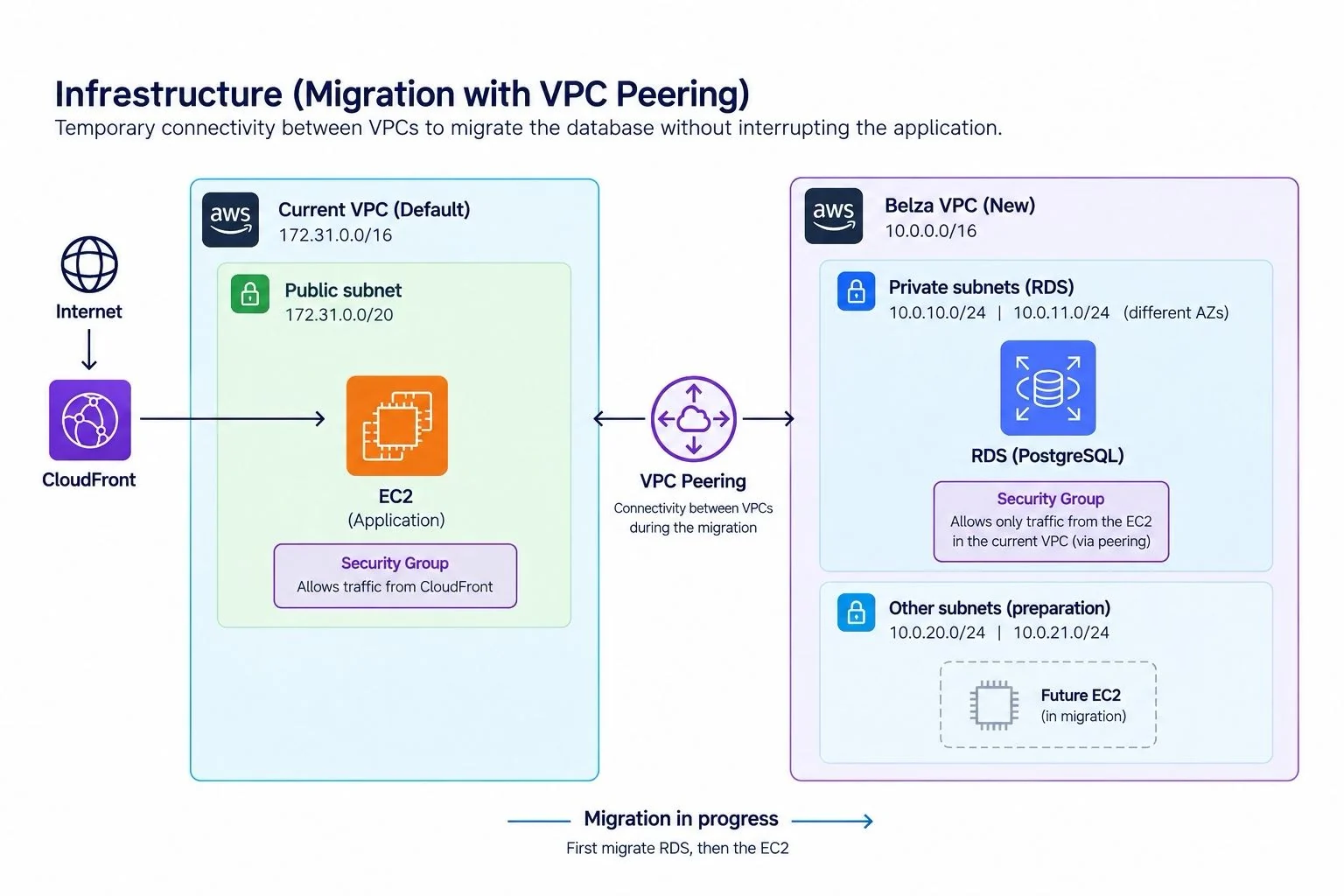
The plan as I first drew it: move the database first, keep the application talking to it through peering, then move the application. The final VPC uses 10.20.0.0/16.
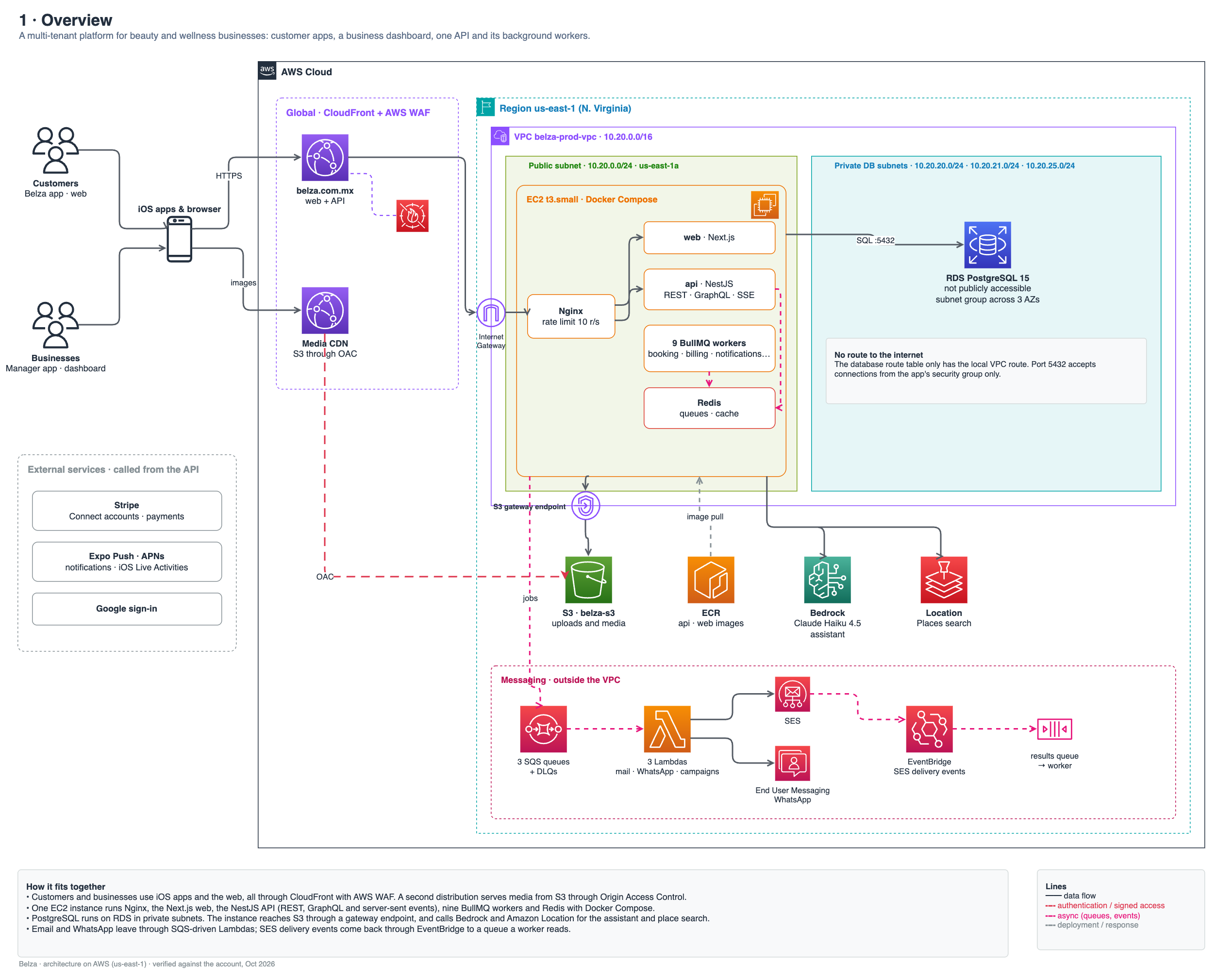
Belza started like many products on AWS: an EC2 instance and an RDS database in the account's default VPC. That VPC is convenient, but every subnet in it is public. The goal was a dedicated VPC where the database lives in private subnets with no route to the internet, and where the application is reached through CloudFront.
Drawing the target took minutes. Getting there without taking down a platform that businesses use to take bookings took most of a day. This is what the migration looked like, step by step, reconstructed from CloudTrail.
The target
- A new VPC,
belza-prod-vpc, on10.20.0.0/16, deliberately far from the default VPC's172.31.0.0/16so the two could be peered without overlapping. - One public subnet (
10.20.0.0/24) for the application, with a route to an Internet Gateway. - Three private database subnets in
us-east-1a,1band1f, whose route table only knows the local VPC route. - An S3 gateway endpoint, so traffic to the media bucket never leaves the AWS network.
- Security groups that reference each other: the database accepts port 5432 only from the application's security group.
Database first, through a peering
Moving the database first meant the application, still in the default VPC, had to keep reaching it during the move. A VPC peering connection between both VPCs solves that, but a peering is only half the work: each side also needs a route to the other side's CIDR, and the security group in front of the database has to allow the old application.
Two details made this easier than expected. Inside the same region, a security group can reference a security group from the peered VPC, so the database rule could point at the old instance's group instead of an IP. And RDS can move to another VPC by changing its DB subnet group, without a snapshot and restore.
aws rds modify-db-instance --db-instance-identifier belza-db \
  --db-subnet-group-name belza-db-subnet-group --apply-immediately

aws rds modify-db-instance --db-instance-identifier belza-db \
  --vpc-security-group-ids <belza-private-db-sg> --apply-immediately
Where it broke
The first attempt to move the database failed three times in a row with InvalidVPCNetworkStateFault: there were no subnets with available addresses in us-east-1f. The database was Single-AZ, so I had planned subnets in two zones. But the instance was running in us-east-1f, and a subnet group must include the zone where the instance already lives, or RDS has nowhere to put it. Adding 10.20.25.0/24 in us-east-1f is why the group now spans three zones for a database that only uses one.
The second surprise was a route. The new VPC's route back to the default VPC was created for 173.31.0.0/16 instead of 172.31.0.0/16. Nothing complains about that: the route is valid, it just points nowhere useful. It showed up only because the connection test failed, and it was fixed an hour later.
The application, from an AMI
With the database in its new home, the server came next. Instead of rebuilding it, I created an AMI of the running instance (belza-prod-before-vpc-migration) and launched it into the new public subnet. Before the real launch, four --dry-run calls checked permissions and parameters without creating anything. The Elastic IP behind origin.belza.com.mx then moved to the new instance, so CloudFront kept the same origin and nothing changed for users.
The whole thing, in order
- 23:07
Create the VPC, then the Internet Gateway route and the S3 gateway endpoint.
- 23:43
Security groups: port 80 for CloudFront's origin-facing prefix list on the app, port 5432 from the app group on the database.
- 23:48
Create the DB subnet group.
- 23:51
Create and accept the VPC peering, add routes on both sides.
- 00:18
Move RDS: three failures until the subnet in us-east-1f exists.
- 00:40
RDS is in the new VPC. Allow the old instance's security group through the peering.
- 00:58
Fix the 173.31 route typo.
- 01:01
Create an AMI of the running server.
- 13:29
After four dry runs, launch the new instance in the public subnet and move the Elastic IP.
- 14:26
Stop the old instance.
- 14:56
Delete the peering routes, the peering and the temporary database rule.
NAT Gateway or not
The obvious next step is to move the application into a private subnet too. That is where costs and complexity appear. A private instance still needs outbound internet for Stripe, push notifications, Google sign-in and container images. A NAT Gateway gives it that for a fixed hourly price plus data processing, which at Belza's size would cost more than the instance it protects.
So the application stays in the public subnet for now, reached through CloudFront, and a private application subnet (10.20.10.0/24) is already in place with the S3 endpoint attached. Gateway endpoints for S3 are free, so that part costs nothing today and is ready for the day the move makes sense.
What I took from it
The difficult part was never the target architecture. It was the order: which piece can move while the others still depend on it, which temporary bridge keeps them connected, and when it is safe to take that bridge down. The peering lived for about fifteen hours, and its whole job was to be deleted.